 3/13/15 Update: Thieves are stealing company web addresses, so please be wary of responding to suspicious "phishing" emails asking you to renew your domain or provide other sensitive account information. Also, guard and take responsibility for your own account user names and passwords.
More details about "Thieves Steal Company Web Addresses" here.
Original Article Below
Who has the keys to your domain...and your web hosting account...and your PayPal account...and all the other online accounts that make your business tick?
As a business, personal, or non-profit website owner, if you didn't answer this question with a resounding "I DO!," you are putting your website and possibly even your entire enterprise at risk.
Many companies such as domain registrars, website hosts, PayPal, banks, and others that are required to keep your sensitive online information safe WILL NOT COMMUNICATE with anyone other than the person who is listed as the main contact in their records. And they certainly will not release user name, password, and other account information to anyone other than the officially designated contact.
Knowing this to be true, consider what might happen in the following scenarios if you are not listed as the primary contact and you do not have a copy of your login information:
- Your employee leaves the company.
- You decide to switch web designers, or your designer retires or closes the business.
- Your spouse divorces you.
- Your relative turns untrustworthy.
- You and your friend or business partner have a falling out.
Now further imagine that one of these common situations arises and you need to:
- Change your account password or contact information.
- Change your web hosting service.
- Change your domain registrar.
- Change your website designer or search engine optimization (SEO) company.
- Access your PayPal account in order to add new payment buttons.
Ouch! You could be in a world of hurt, as one of our new customers discovered recently.
The bottom line is that YOUR contact information should be on ALL these accounts, and YOU should have a copy of all the login information for these accounts: that means URL addresses (e.g., paypal.com, namecheap.com, gmail.com, etc.), user names, and passwords. PLEASE do not rely on others (or Precision Computing Arts) to keep this essential information safe for you!
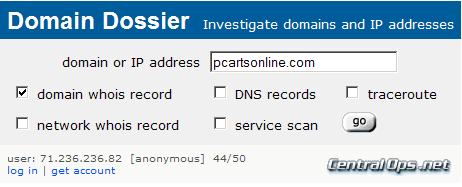
Tip: Here is one way to find out who is listed as the primary contact for your website's domain and to learn the nameservers for your website hosting account:
- Go to http://centralops.net/co/DomainDossier.aspx
- Type in your domain name (e.g., pcartsonline.com). Omit the www.
- Check the domain whois record box.
- Click GO. (Note: If you have changed the information recently, it may take about 24 hours to see the most recent changes.)
Oh, in case you are wondering, when Precision Computing Arts / Fastwebdev sets up an account for you, we never list our company as the registration, administrative, technical, or billing contact. We always list you — the company owner (or your designee) — and we always provide you with the complete login information for every account that we set up on your behalf. PLEASE STORE THIS INFORMATION IN A SAFE PLACE!
Questions? Please contact us.




 We're often competing with other website designers and website hosting systems for business. It's a tough market out there!
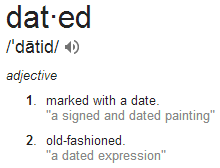 Google the term "Dated" and you'll find a definition that includes "old fashioned." Watch just about any episode of House Hunters on HGTV, and you'll repeatedly hear people complaining about dated decor and cluttered layouts. Website designs, like home decor, can become outdated as tastes change and technologies accelerate faster than forest fungi after a Pacific Northwest rain. A website over two years old may be due for a makeover.